Men's Bags · with Amani
AI men's bag photoshoot, from one product photo
A bag should be carried naturally and keep its true size next to the model. Photograph it front on with the handles up and the hardware visible.
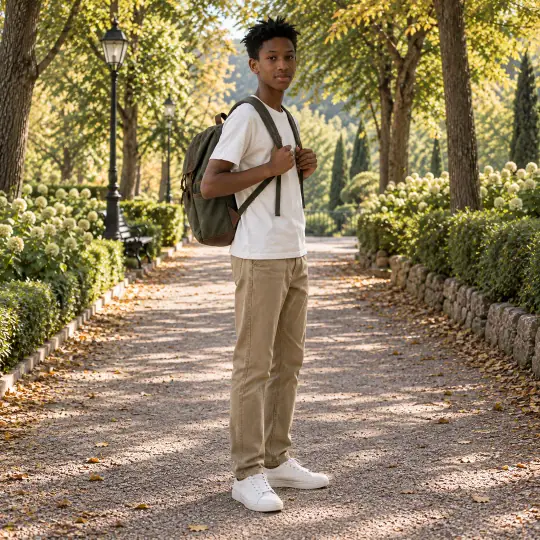
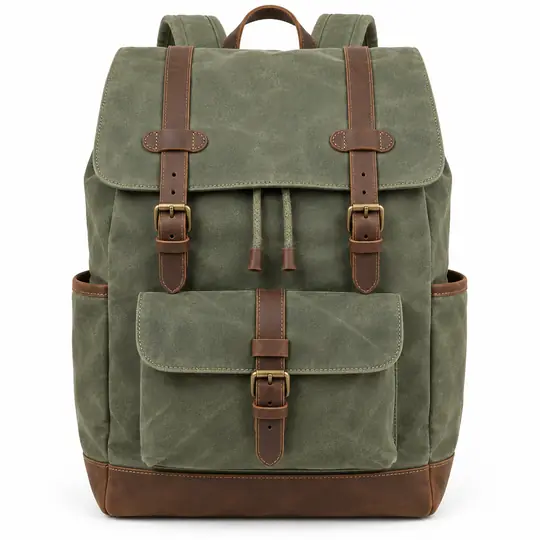
Shown here: Amani, A Pose Studio models. The photo in the corner of the first image is the one product photo it was made from. Made in the A Pose Studio app, for 5 credits an image; the product photos are AI-generated and unbranded.
Before you upload
The product photo
- Photograph the bag front on, handles up, on a plain background.
- Add a close-up of the hardware, zip or fabric grain.
- Add a side photo if the bag is deep.
More in preparing product photos.
In the app
Poses and scenes that work
- Walking: the bag carried on the shoulder, in motion.
- Carry: the bag held, showing its size against the body.
- Seated: the bag beside the model, showing the full front.
Lifestyle and outdoor scenes such as Park Path suit backpacks and totes; travel scenes suit weekender and duffel bags.
Choose the model your buyers look like
A Pose Studio has 40+ models, so you can show the same product on a young slim model, a plus-size or mature one, or a model who wears a turban or a prosthetic leg. On the Model step of Create, filter by gender, age, ethnicity, body type or collection, or browse first on the models page. The price is the same for every model: 5 credits an image, ₹12 to ₹15$0.35 to $0.50 depending on the pack. Pricing.
What to check before you publish
Compare each image with your product photo: the size next to the model, the colour, and details such as the dial, the lenses or the hardware. Retry any image with a note on what should change; every version is kept. How to retry. Also see everything else A Pose Studio makes for a listing.