Aaina in ChatGPT
Make product photos by chatting: @Aaina in ChatGPT
Attach a photo of your product and tag @Aaina. Aaina reads the product, suggests models, poses and scenes on a card in the chat, and makes the photos when you press Make.
You connect with an A Pose Studio account. You can create one when you connect. A Pose Studio is the new name of Aaina; in ChatGPT the app still uses the earlier name, Aaina.
How it works
How do I make product photos in ChatGPT? Four steps.
- Tag @AainaStart a chat, type @Aaina and attach a clear photo of your product. Say what you want, such as the scene or the marketplace.
- Check the cardThe Aaina card shows the product it read and suggests a model, poses and a scene. Change any of them, or name your own in the chat.
- Press MakePhotos are made only when you press Make: one for each pose, up to six at once. Each takes about a minute.
- DownloadWatch the photos arrive and download them, or open the shoot in A Pose Studio for each marketplace's image shape.
Try saying
Things to ask @Aaina.
Start with the tag, so ChatGPT uses Aaina.
- @Aaina put this T-shirt on a model in a white studio for my Amazon listing
- @Aaina show my kurta on a model in an outdoor scene
- @Aaina which poses suit this dress for my Myntra photos?
Made in A Pose Studio
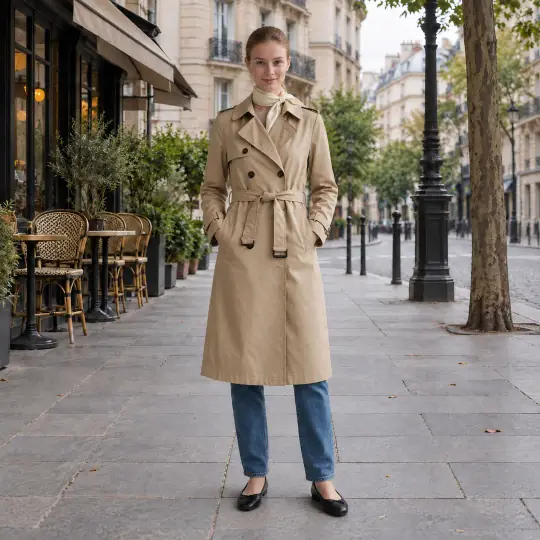
What you get. Product on a model.
These photos were made in the A Pose Studio app. In ChatGPT you get photos from the same studio.
Trench coat · Paris Café Street
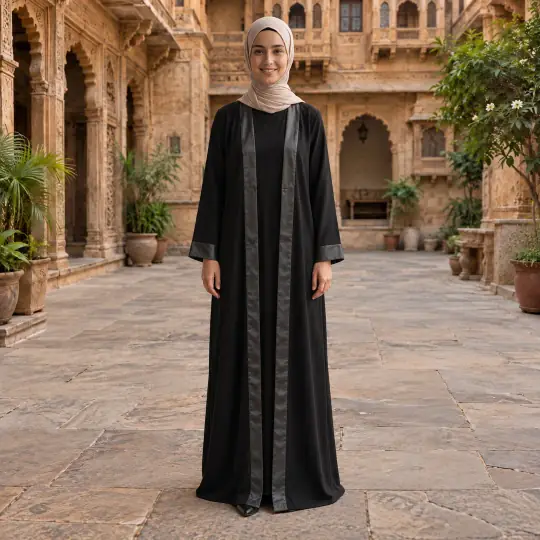
Abaya · Haveli Courtyard
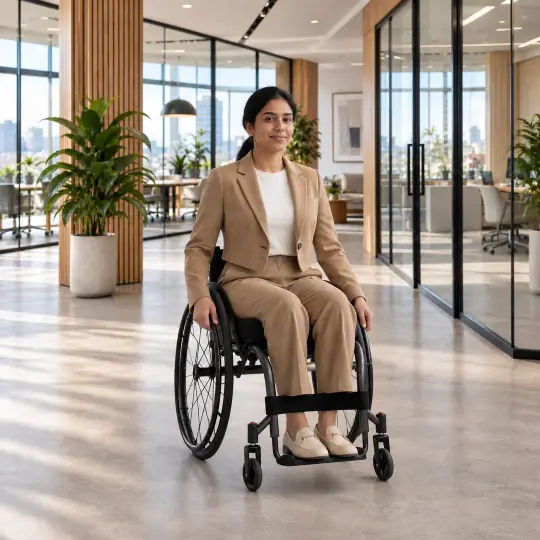
Blazer · Modern Office
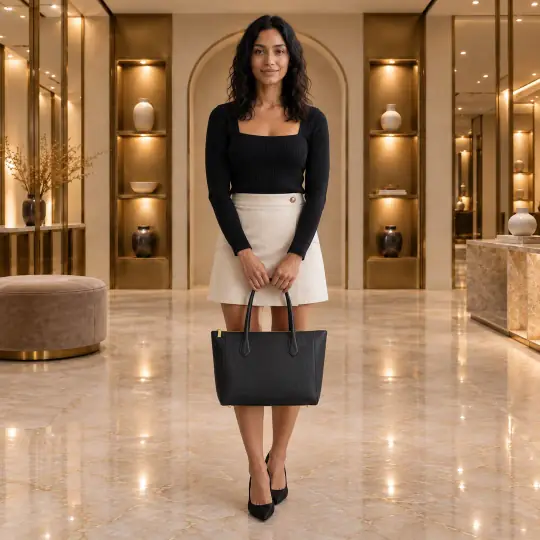
Leather tote · Designer Boutique
Good to know
Before you start
- A Pose Studio works from product photos: clothing and ethnic wear, jewellery, bags, shoes and accessories.
- Studio models in ChatGPT are adult, fictional people created for A Pose Studio.
- A Pose Studio does not edit photos of real people or photos already made.
- Your photos are saved in your A Pose Studio account, and the Your photos tab lists them.
- If ChatGPT uses its own image tool, tag @Aaina again.
Questions
About Aaina in ChatGPT
What is Aaina in ChatGPT?
An app you use inside a ChatGPT conversation. Tag @Aaina, attach a photo of your product, and Aaina reads the product and suggests models, poses and scenes on a card in the chat. You check the choices, press Make, and your product appears worn by a model.
How do I start?
Open Aaina from ChatGPT's apps and connect it. When you connect, sign in to your A Pose Studio account or create one. Then start a chat with @Aaina and attach a product photo.
Why do I need to type @Aaina?
Tagging @Aaina tells ChatGPT to use Aaina, rather than its own image tool, which would not keep your product accurate.
Will it make photos without asking me?
No. Photos are made only when you press Make on the card. Until then you can change the model, the poses and the scene.
Can I name the model or the scene?
Yes. Say, for example, "put this T-shirt on a model in a white studio", and the card opens with that scene chosen. You can also ask which poses or scenes suit your product.
How many photos can I make at once?
Up to six: one photo for each pose you choose. Each photo takes about a minute.
Where do my photos go?
They are saved in your A Pose Studio account, so they are also in A Pose Studio on the web, and the Your photos tab in the chat lists every photo you have made with Aaina, newest first. You can download them from the chat or open the shoot in A Pose Studio for each marketplace's image shape.
Which models can I use in ChatGPT?
Adult studio models. They are fictional people created for A Pose Studio. A Pose Studio works from product photos only: it does not edit photos of real people or photos you already made.
Does the whole studio work in ChatGPT?
Not yet. ChatGPT makes photos of your product on a model. Videos, ghost mannequin, flat-lays, colours, listings, teams and the rest are in A Pose Studio on the web.
Your product, on a model, in a chat.
Open Aaina from ChatGPT's apps, tag @Aaina and attach your product.
Open Aaina in ChatGPT