Aaina for Shopify
Model photos for your Shopify products, inside your Shopify admin
Pick a product, and Aaina suggests a model, poses and a scene. Make the photos, then add them to the product page in one click. It also writes the product description, SEO title, tags and image alt text.
Published on the Shopify App Store. No Aaina account needed: your store is your sign-in. A Pose Studio is the new name of Aaina; the Shopify listing still uses the earlier name, Aaina.

What you can do
From one product photo to a finished product page.
Photos on a model
Choose from 350+ models and 400+ scenes. Aaina suggests what suits the product, and you can change any choice.
Every colour, one shoot
See which colours of a product still have no photo and make them, or any colour you name. Colour photos are matched to the right variants.
Ghost mannequin
The garment alone in its worn shape on white, for clothing. Front, three-quarter and back views.
Product page text
Description, SEO title, meta description, tags and alt text in your store's language. Choose what to apply; undo for seven days.
Made in Aaina
What one photo becomes.
Drag to compare. These were made in the Aaina app from the product photo on the left.
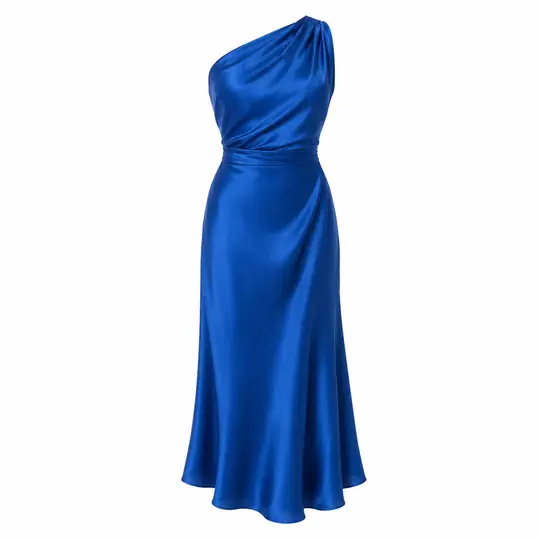
Product photo to model
The same dress on a model by a poolside villa.


Every colour
The same photo in another colour; face, pose and scene stay.
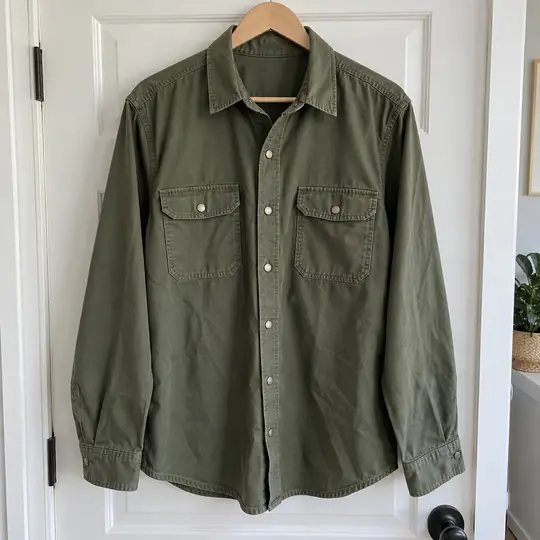
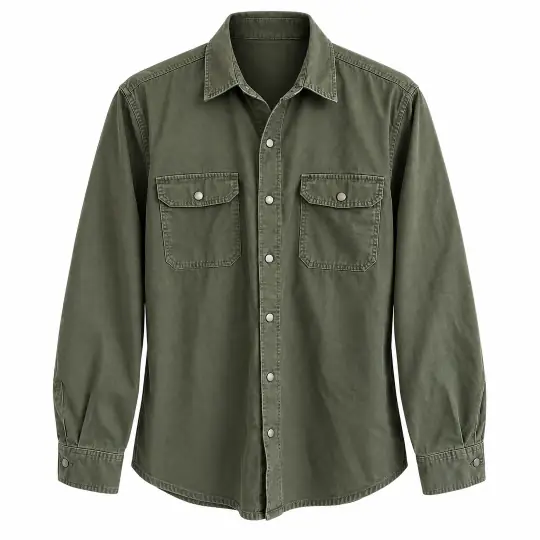
Ghost mannequin
The garment alone, in its worn shape, on white.
How it works
How do I add model photos to a Shopify product? Four steps.
- Install and openAdd Aaina from the Shopify App Store, then open it from Apps in your admin. Or open a product and choose More actions, then Aaina photos.
- Pick a productChoose a product with a photo. Aaina reads it and suggests a model, poses and a scene, ready to change.
- Make the photosPress Make. The photos take about a minute. Tick the colours that have no photo yet to make those too.
- Add to productChoose the photos you like and press Add to product. They appear on the product page with descriptive alt text. Then write the product details if you want them.
Credits and billing
Paid through Shopify
- You buy credit packs inside the app. The charge appears on your Shopify bill, and only the store owner can approve it.
- Shopify pricing is its own: see the app or the Shopify listing. It is separate from aposestudio.com prices.
- New stores get free credits to start, so you can try it on a real product first.
- Credits never expire, and credits for a photo that fails come back.
- Credits you buy in Shopify belong to your store. They are separate from an aposestudio.com account.
Good to know
Before you start
- Nothing on your product changes until you press Add to product or Update product.
- Aaina needs permission to read and edit products, to add photos and text, and to read your store's language.
- Photos you make stay with your store until you uninstall the app, and are deleted when Shopify asks Aaina to remove the store's data.
- Photo files carry an AI-generated tag.
- Videos, flat-lays and team brands are on aposestudio.com, not in the Shopify app.
Before you install
Choose the studio that fits your workflow
Use the Shopify app when your product is already in a store and you want selected results added to that product. Use the website when you need the broader studio or a shared team brand. Check the product details before applying either photos or written text.
| Question | Shopify | Website |
|---|---|---|
| How do I sign in? | Through your Shopify store. | With an Aaina account. |
| Where do credits belong? | To your store, billed through Shopify. | To your personal studio or brand. They cannot be moved into Shopify. |
| What changes my listing? | You choose Add to product or Update product. Written changes can be undone for seven days. | You download selected results and publish them to your chosen channel. |
| Which extra tools are included? | On-model, colour and ghost mannequin photos, plus product page text. | The full studio, including videos, flat-lays and team brands. |
Try a product with a recognisable print or detail first. Inspect the result at full size, confirm the product variant, then add only the photos you would publish. The current Shopify prices and any available reviews are on the official Shopify listing.
Questions
About Aaina for Shopify
What is Aaina for Shopify?
An app in your Shopify admin that turns a product photo into photos of your product on an AI model, then adds the photos you choose to the product page. It can also write the product page text. It is published on the Shopify App Store.
Do I need an Aaina account?
No. Your Shopify store is your sign-in. Install the app and open it from Apps in your admin. Photos you make in the Shopify app stay with your store, and credits you buy there are separate from an aposestudio.com account.
How do I pay?
Through Shopify. You buy credit packs inside the app, the charge appears on your Shopify bill, and only the store owner can approve it. Shopify pricing is its own and is shown in the app and on the Shopify listing; it is not the same as the prices on aposestudio.com. New stores get free credits to start.
Does it change my products on its own?
No. Nothing on a product is changed until you press Add to product, or Update product for the written text. The text can be undone for seven days.
Which models and scenes can I choose?
The same studio as the website: 350+ AI models of every age, size and skin tone, including modest wear, maternity and adaptive models, and 400+ scenes, or a plain colour background. Aaina suggests the models, poses and scenes that suit your product.
Can it make a photo for every colour?
Yes. Aaina reads the colour options of your product and shows which colours still have no photo. You can make up to six colours at a time, and any other colour you describe. A colour photo becomes the image of that colour's variants only when those variants have no image yet; an image a variant already has is never replaced.
What does it write for the product page?
A description, an SEO title, a meta description, tags and image alt text, from your photo and your product details, in your store's main language. You choose which fields to apply.
Is everything from the website in the Shopify app?
No. The Shopify app makes photos on models, ghost mannequin photos, photos in every colour and product page text. Videos, flat-lays, team brands and the rest are on aposestudio.com.
Are the photos marked as AI-made?
Yes. The photo files carry an AI-generated tag, and the alt text names the model and scene.
Also from Aaina
Keep going
The same studio works on the website for videos, flat-lays and teams.
Your products, on a model.
Install from the Shopify App Store and open it from your admin.
Add to Shopify